

Your Facebook Business Page is one of your most powerful marketing assets. It builds trust, drives leads, and puts your brand in front of thousands of potential customers. But all of that can unravel the moment a wave of fake or spam reviews lands on your page.
The bad news: you cannot directly delete a Facebook review. The good news: you have several effective options, and staying on top of them is exactly what separates businesses that thrive online from those that quietly lose customers to suspicion.
This guide walks you through everything, from spotting the problem to taking action.
Why Spam Reviews Hurt Your Business
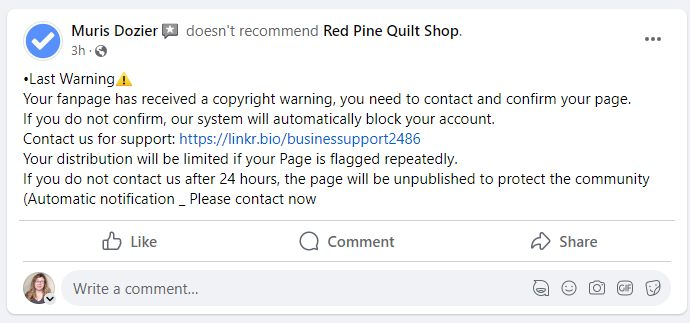
Spam reviews are more than a nuisance, they actively mislead potential customers. Whether it is a competitor sabotaging your page, a disgruntled former employee venting, or a bot campaign spreading fake negative feedback, the outcome is the same: real people read those reviews and form real opinions about your brand.
When a prospective client lands on your Facebook page and sees a string of suspicious one-star ratings with vague, unrelated text, they do not stop to verify authenticity. They move on to a competitor. That lost lead costs you real revenue.
Key insight: Facebook launched its Community Feedback Policy in 2022, using AI and human reviewers to detect and remove fraudulent reviews. Despite this, spam still gets through which means active management on your end remains essential.
Types of Spam Reviews to Watch For
Not all spam looks the same. Here are the most common forms that show up on Facebook business pages:
Competitor attacks
Negative reviews posted by rival businesses or people hired to damage your reputation.
Bot-generated reviews
Bulk fake reviews from automated accounts, often with generic text unrelated to your business.
Paid fake positives
Some businesses purchase glowing reviews to inflate ratings, violating Facebook’s policies.
Retaliatory reviews
Reviews left by ex-employees or angry customers that are exaggerated, false, or defamatory.
How to Remove Spam Reviews from Facebook
Reporting is your primary weapon against spam reviews. If a review violates Facebook’s Community Standards, it is irrelevant, offensive, contains hate speech, or is clearly fake, you can flag it for Facebook’s team to review and remove.
Here is the step-by-step process:
- Go to your Facebook Business Page: Log in as an administrator and navigate to your page.
2. Open the Reviews or Recommendations tab: Scroll to find the review you want to report.
3. Click the three dots (…) on the review: This opens a dropdown menu with action options.
4. Select “Find Support or Report Review”: Choose the most accurate reason from the list that appears.
5. Submit the report and wait: Facebook reviews reports within a few days. Removal is not guaranteed but is common for clear violations.
Tip: The more specific and accurate your reason for reporting, the more likely Facebook is to act. Always select the option that best describes why the review violates policy, rather than choosing a generic option.
How to Hide or Disable the Reviews Tab
If spam reviews are flooding your page faster than Facebook can respond, you can temporarily hide the entire Reviews section. This does not delete reviews, it simply makes them invisible to visitors until you choose to restore the tab.
- Go to your Page as an administrator. Make sure you are logged in with admin access.
2. Click “More” then “Manage Sections”This opens the section management panel for your page.
3. Toggle off the “Reviews” section Save your changes. The tab will no longer appear publicly.
4. Re-enable when the issue is resolved Once spam has been reported and removed, turn the tab back on to restore social proof.
Use this option with care. If your page has strong genuine reviews, hiding them temporarily protects your brand from a spam wave. But keeping reviews hidden long-term removes an important trust signal for new visitors.
How to Respond to Negative Reviews
Not every negative review is spam. Sometimes a real customer has a real complaint, and how you handle it publicly says just as much about your brand as the complaint itself. Responding professionally can actually turn a negative experience into a demonstration of excellent customer care.
Best practices when responding:
- Stay calm and professional. Never argue publicly, even if the review is unfair. Future customers are watching your response, not just the review.
- Acknowledge and empathize. Even if you disagree, start by thanking the reviewer and acknowledging their experience.
- Take the conversation offline. Invite the reviewer to contact you directly via email or phone to resolve the issue.
- Respond promptly. A response within 24–48 hours shows visitors your business is active and attentive.
- For obvious spam, keep it brief. A simple “We have no record of this interaction and have flagged it for review” is sufficient without engaging the content.
Proactive Steps to Protect Your Reputation
The most effective reputation strategy is not reactive, it is preventive. Businesses that consistently generate genuine positive reviews are far more resilient against occasional spam attacks.
1. Ask satisfied customers for reviews
Your happiest customers are your best defense. A steady stream of authentic positive reviews drowns out sporadic spam and raises your overall rating. Make it easy by sending a direct link to your Facebook Reviews tab after a successful interaction.
2. Monitor your page regularly
Set up notifications for new reviews in your Facebook Page settings. The sooner you spot spam, the sooner you can report it — before it shapes too many first impressions.
3. Strengthen your page security settings
Review and tighten your page’s privacy and security settings. Control who can post content, manage admin access carefully, and enable two-factor authentication to prevent unauthorized account activity that could compromise your page.
4. Maintain a transparent, active presence
Pages that post regularly, respond to comments, and demonstrate consistent engagement are harder to attack and more trusted by visitors. A single spam review carries far less weight on an active page with dozens of genuine interactions visible.
5. Consider reputation management support
For businesses scaling their online presence, manual review monitoring is time-consuming. A digital marketing partner can handle review monitoring, reporting, and response strategies as part of a broader reputation management plan, freeing you to focus on running your business.
